


A scene every designer in the GCC knows too well
Your product goes live in a couple of days, and you’re ready for final client sign-off. You walk into the room and take the client through the product. You run the English happy flows. Smiles all around.
Then comes the question: “OK, let’s see the Arabic.”
You hand over the app, and the issues multiply instantly:
- The Arabic terms used in CTAs are inconsistent for the same actions
- The features are labelled with literal translations that the Arabic stakeholders don’t understand
- Text truncation cuts off critical instructions
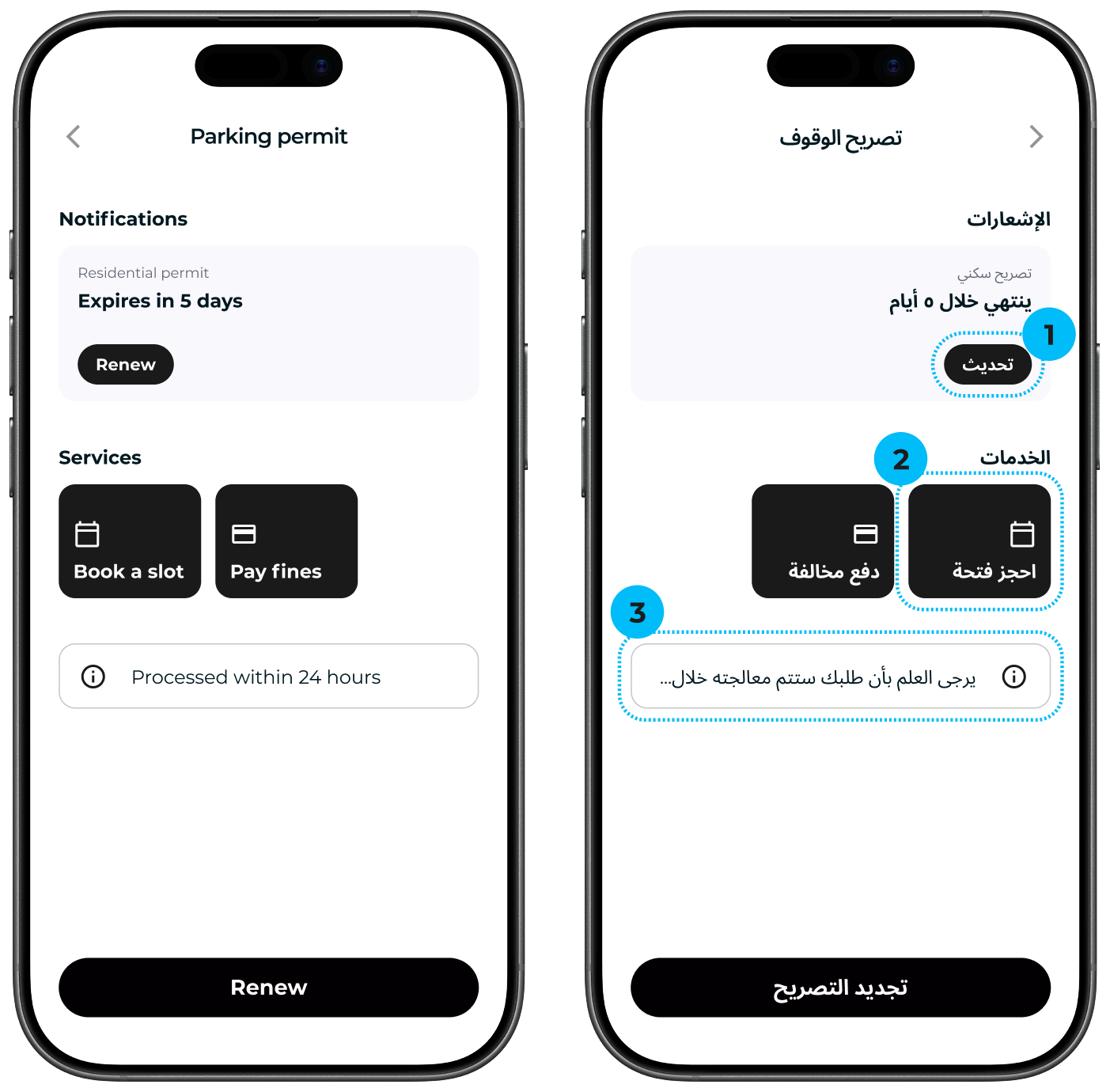
1. Inconsistent CTA terms
The same action, “Renew”, appears as two different words: تحديث (update) and تجديد (renew).
2. Literal feature label
“Book a slot” became احجز فتحة, a slot as in a physical opening, not an appointment.
3. Truncated instruction
A one-line notice sized for “Processed within 24 hours”. The formal Arabic copy (“Please note that your request will be processed…”) runs longer, so the timeframe users need is cut off.
What looked like a minor translation task is suddenly weeks of structural redesign and unbudgeted component development. You start doing the math in your head. Who can I hire to get this done by launch? Why didn’t my Arabic designer flag these things? Panic sets in.
Sounds familiar? It doesn’t have to end this way.
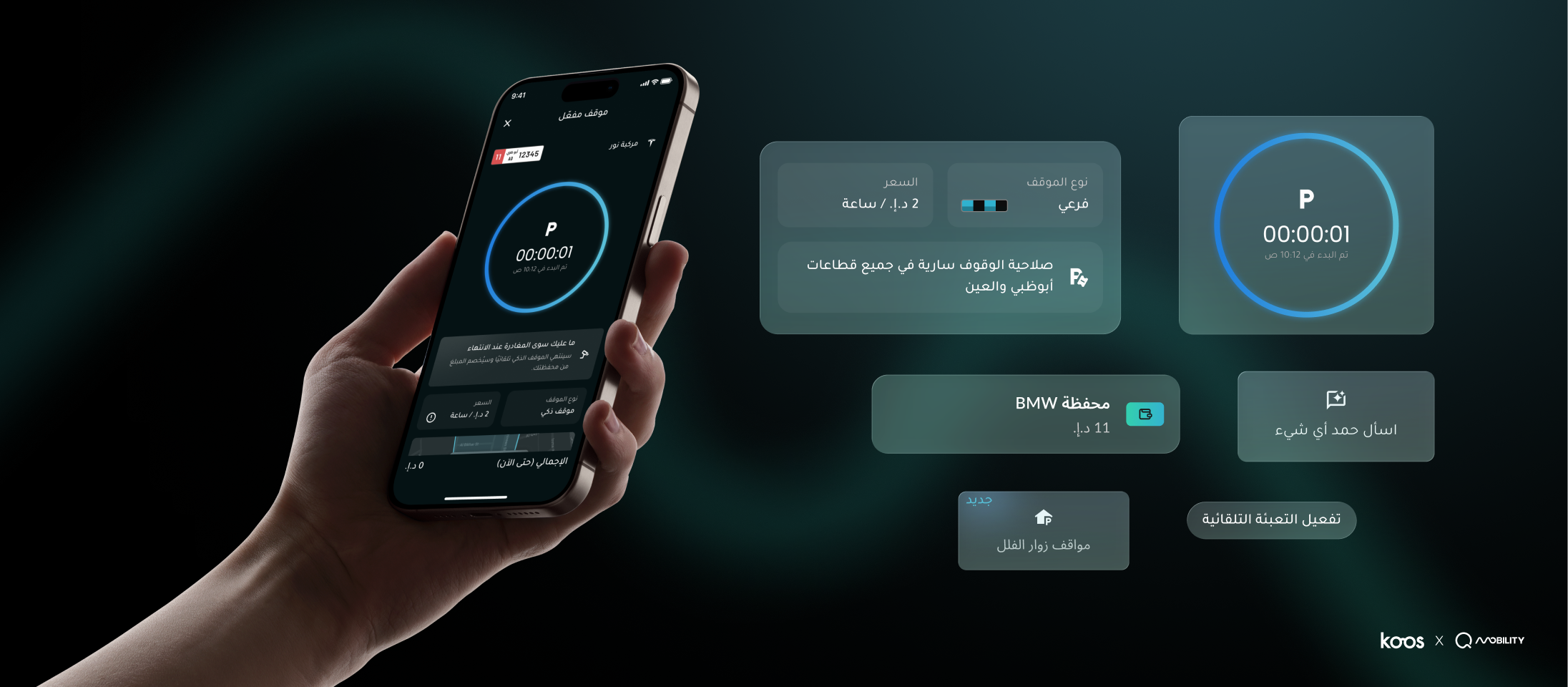
When we worked with Q Mobility to redesign Abu Dhabi’s DARB app, we designed the Arabic and English experiences together from the start. Arabic UX design meant thinking beyond translation: how the interface should flow from right to left, how Arabic and English content should work together on the same screen, and how both languages could share one design system.
That work helped shape the five building blocks below.
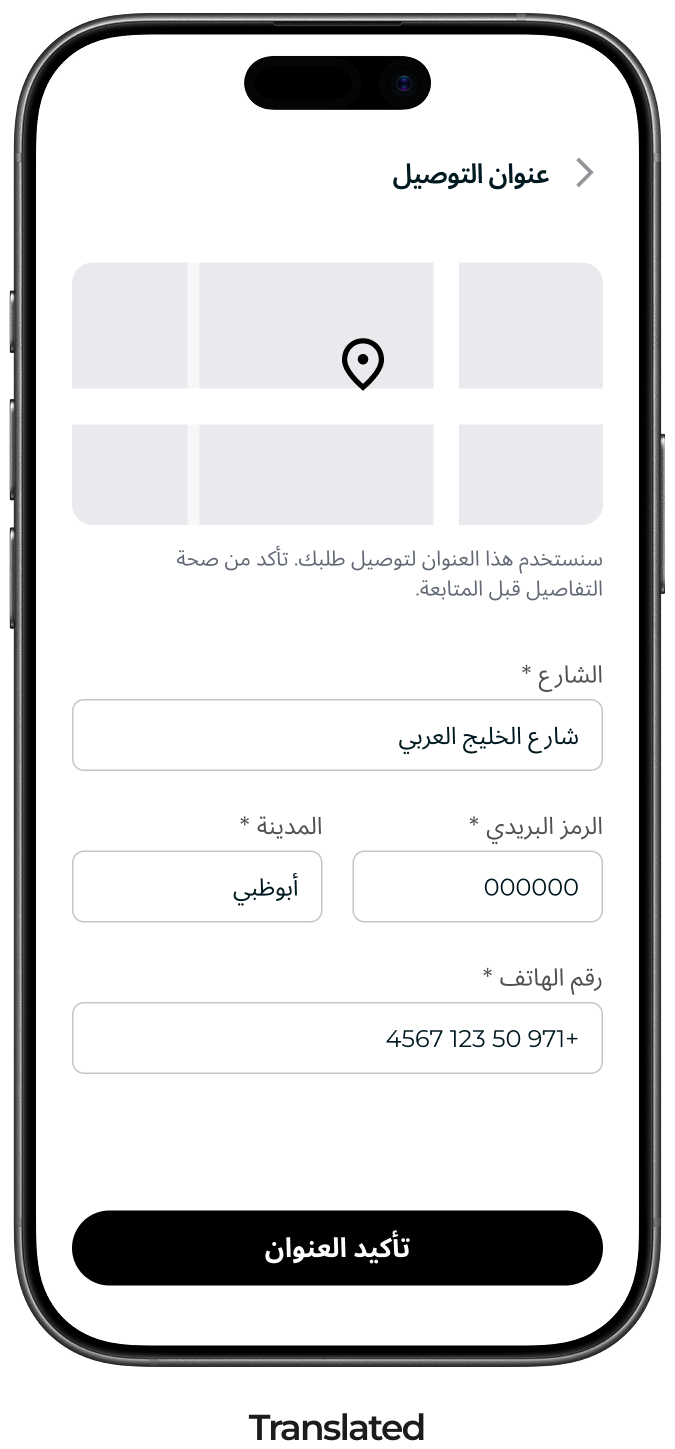
1. A postcode that doesn’t exist
The form was translated from a foreign template. The UAE has no postcodes, so users enter 000000 to bypass it.
2. Phone number reversed
Mixed-direction content wasn’t handled, so the number reads backwards and is right-aligned.
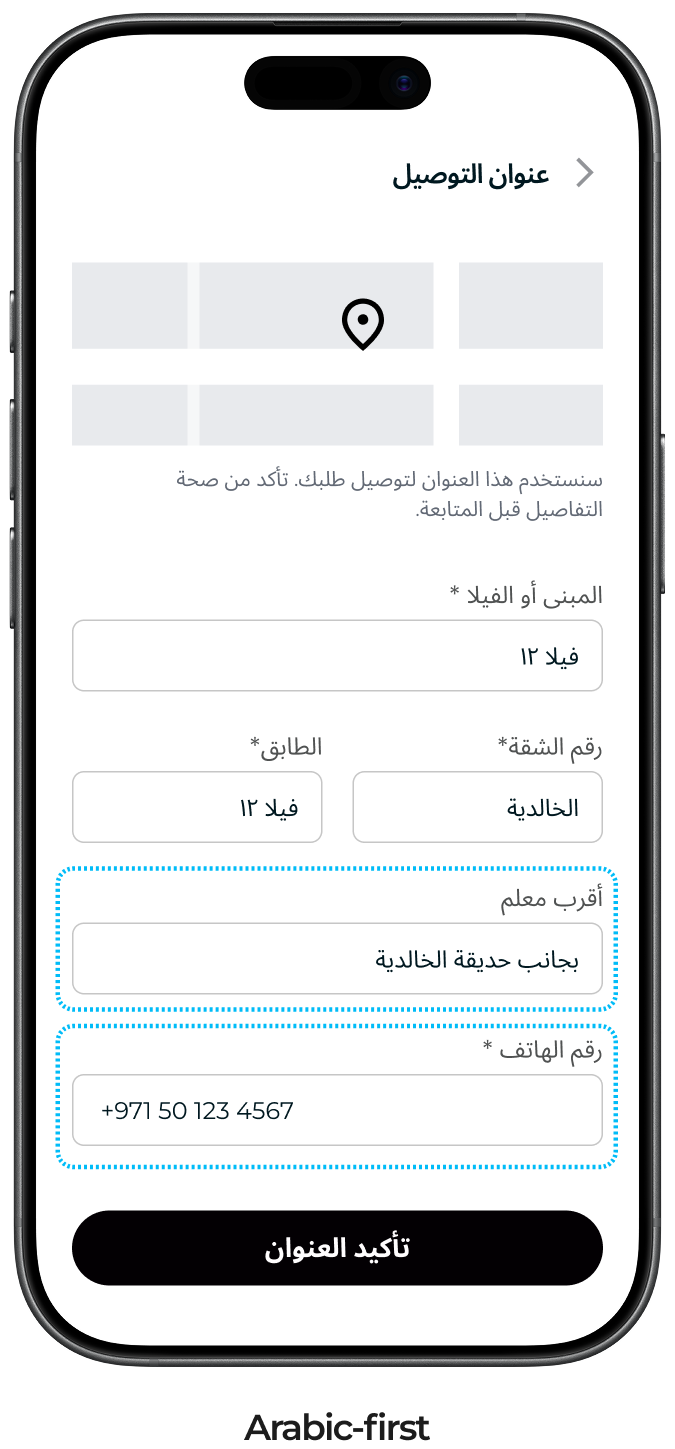
3. Fields that match local addresses
Area, building or villa, and a nearby landmark, the way people in the UAE give directions.
4. Mixed content handled
The phone number stays left-to-right in the Arabic layout.
Five building blocks for Arabic UX design
Use these five building blocks to ensure that you are designing for arabic speakers from the start, and not just mirroring it at the end.
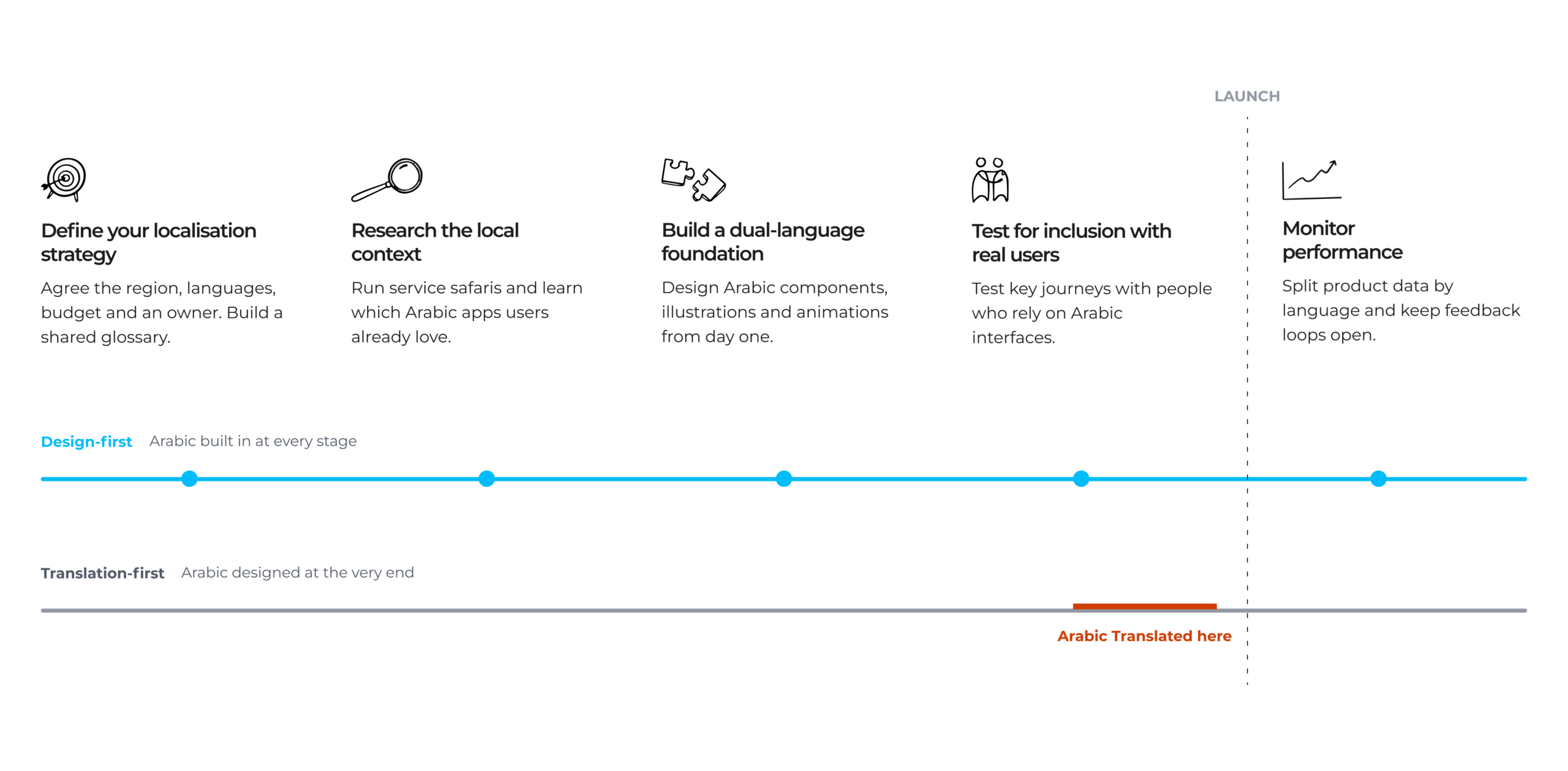
1. Define your localisation strategy collectively
Before you build your first frame, you should establish:
- The region you are designing for
- Which languages you are designing for?
- What budget is allocated to design for those languages?
- Who will own this process and keep your team accountable?
Rather than treating Arabic as an isolated design task, treat it as a collective business effort. Sit together as a team to establish guidelines, tone of voice, and a shared glossary list.
This collaborative approach ensures everyone stays aligned and that business goals genuinely match user needs, guaranteeing that Arabic speakers’ requirements are addressed throughout the entire project lifecycle.
2. Research the broader local context
You should aim to understand your users context rather than just translating terminology. Run service safaris to see real-life scenarios, and understand your users’ challenges and pain points. You can also ask users about their favourite Arabic apps to build a relevant pool of references for benchmarking and inspiration.
Gathering this context prevents you from building a product built on assumptions that ignores your users’ physical reality.
3. Build a comprehensive dual-language foundation
Design Arabic components, interactions, illustrations, and animations as part of your design system from day one.
By defining these global rules early, you avoid expensive development rework later on when components inevitably break, labels get cut off, or culturally specific animations (like a loading spinner that shouldn’t be mirrored) spin the wrong way.
4. Test for inclusion with real users
Include Arabic speakers who rely on Arabic interfaces in your user testing to ensure you are designing for all types of users. Instead of designing for one segment and hoping it works for the rest.
Testing early with primary Arabic users guarantees business value by preventing the trap of bilingual users mentally reverse-engineering broken translations. It guarantees the product actually responds well to your primary target audience.
5. Monitor performance
Finally, keep learning after launch. Localisation does not end when the Arabic version ships. Make sure that you set up feedback cycles with regional teams and support, and explicitly analyse your product data split by language rather than blending them.
Segmenting this data is the only way to measure the true health of your product. If you never split your metrics, you will never tell the difference between a language nobody is using and a language that was never designed for. Also, you will not know if a feature is simply unpopular, or if it is completely broken and inaccessible for half of your user base.
Design Arabic UX before assumptions become expensive
Design Arabic UX before assumptions become expensive
The most expensive English-first assumptions are often the ones nobody says out loud. They become part of your strategy, journeys, components and code. By the end of the product cycle, translating into Arabic won’t be enough to meet your users’ needs.
Good Arabic UX design starts while those decisions are still open. The five building blocks come down to three principles:
- Name your assumptions. Make them explicit so your team can question them before they end up in production.
- Embrace both languages from day one. Leaving Arabic until later means carrying unresolved design problems into development, where changes become more expensive.
- Put Arabic speakers in the room at every stage. Not at the end, when the only thing still flexible is the wording.
That’s how you move from an experience users have to work around to one that feels built for them.
At Koos, our designers bring research, product strategy and Arabic-first design together to create digital products that feel native.
Building or improving a bilingual product? Let’s talk about getting the foundations right.
Arabic UX design is the process of creating digital products centred on the needs of Arabic-speaking users. It considers users’ local context, language, right-to-left layouts, typography and content. Effective Arabic UX starts with research into a specific audience, rather than assuming all Arabic-speaking users have the same needs.
Translation conveys content in Arabic. Arabic localisation adapts the wider product experience to its intended users and market, including terminology, layouts, forms, formats and interactions. Translation is part of localisation, but it cannot fix English-first assumptions built into a product’s journeys or components.
Arabic localisation should start during discovery, before user journeys and components are finalised. Establish the target markets, language requirements, ownership and budget early. Designing Arabic and English together helps teams identify problems while they can still change the product’s structure, rather than patching it before launch.